Trang này chỉ dành cho mục đích thông tin. Một số dịch vụ và tính năng có thể không khả dụng ở khu vực pháp lý của bạn.

Complete Beginner’s Guide to Buying and Selling Crypto on OKX P2P Across Pakistan

1. Create and Verify Your Account (KYC)

[OKX app home screen showing Sign Up or Log In button]
[Screenshot 2: Identity Verification screen with document upload options]

Steps:

  1. Download the OKX app.

  2. Create an account using email or phone.

  3. Go to Profile.

  4. Tap Identity Verification.

  5. Upload your National ID, Passport, or Driver’s License.

  6. Take a selfie and submit.

2. Add Your Payment Method

[Screenshot 3: Profile menu with Payment Methods visible]
[Screenshot 4: Add Payment Method page (mobile money, bank transfer, fintech options)]

Steps:

  1. Open P2P Trading.

  2. Tap Profile.

  3. Select Payment Methods.

  4. Tap Add Payment Method.

  5. Choose your preferred payment option.

  6. Enter accurate details matching your KYC name.

3. How to Buy Crypto on OKX (Express Buy and P2P Buy)

Express Buy

[Screenshot 5: Buy Crypto page with Express highlighted]
[Screenshot 7: Payment confirmation page showing seller details] [Image]

Steps:

  1. Tap Buy Crypto.

  2. Select Express.

  3. Pick your local currency (E.g PKR).

  4. Choose the crypto you want. (Eg USDT).

  5. Enter amount.

  6. Pay to seller.

  7. Tap I Have Paid.

  8. Wait for crypto release.

P2P Buy

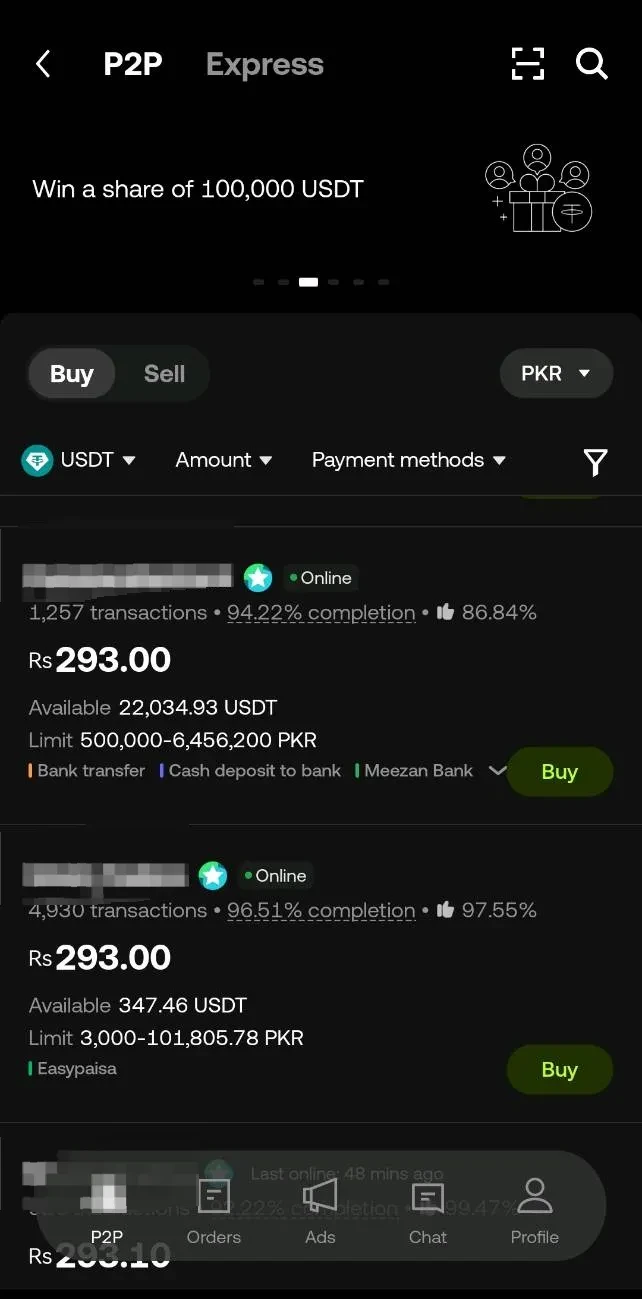
[Screenshot 8: P2P Trading homepage with Buy selected]
[Screenshot 10: Order page showing merchant details and payment timer]

Steps:

  1. Go to Home Page.

  2. Select P2P Trading.

  3. Tap Buy.

  4. Choose your currency.

  5. Pick the crypto.

  6. Compare sellers.

  7. Tap Buy from Merchants ADs.

  8. Pay seller through give. payment methods.

  9. Tap I Have Paid.

  10. Receive crypto.

4. How to Sell Crypto on OKX (Express Sell and P2P Sell)

Express Sell

[Screenshot 11: Sell Crypto page with Express selected]
[Screenshot 12: Order summary showing payout currency and payment method] [Image]

Steps:

  1. Tap Sell Crypto.

  2. Select Express.

  3. Choose currency.

  4. Select crypto.

  5. Enter amount.

  6. Wait for buyer payment.

  7. Crypto releases automatically.

P2P Sell

[Screenshot 13: Transfer page to Funding Account]
[Screenshot 14: P2P Sell page with buyer list]
[Screenshot 15: Order page with Release Crypto button]
[Screenshot 15: Order page with Release Crypto button]
[Screenshot 16: Order page with Release Crypto button]
[Screenshot 17: Order page with Release Crypto button]

Steps:

  1. Move crypto to Funding Account.

  2. Go to P2P Trading.

  3. Tap on Sell from Top.

  4. Choose currency (Eg PKR).

  5. Select crypto (Eg USDT).

  6. Review Merchant's Ads to sell.

  7. Tap Sell.

  8. Wait for payment.

  9. Confirm payment has arrived.

  10. Tap Release Crypto.

5. Safety Tips for PKR P2P Users

Tips:

  1. Confirm payment in your bank app before releasing crypto.

  2. Do not trust screenshots.

  3. Trade and chat only inside OKX.

  4. Avoid low-rated or new traders

  5. Match bank account name with trader’s verified name.

  6. Never trade outside the platform (WhatsApp, call, etc.).

  7. Enable 2FA for account security.

  8. Open an appeal if anything feels suspicious.

6. Why OKX Works Well for Pakistanis

  1. Zero P2P fees.

  2. Fast bank transfers & mobile payments.

  3. Large network of merchants.

  4. Strong security(Check out our Proof of Reserves).

  5. Verified & trusted sellers available.

  6. Beginner-friendly interface.

  7. PKR support.

  8. High liquidity.

  9. 24/7 availability.

  10. Quick customer support & appeals system.

  11. Wide range of crypto options.

Bottom Line

  1. Complete KYC - Unlock full account access and trading features.

  2. Add a Payment Method - Make buying and selling fast and smooth.

  3. Use Express Buy - Best for quick, beginner-friendly purchases.

  4. Use P2P Market - Ideal for getting the best PKR rates.

Tuyên bố miễn trừ trách nhiệm
Nội dung này chỉ nhằm mục đích cung cấp thông tin và có thể sẽ bao gồm các sản phẩm không được cung cấp ở khu vực của bạn. Nội dung này không nhằm mục đích cung cấp (i) lời khuyên hay đề xuất đầu tư, (ii) lời đề nghị hoặc chào mời mua, bán hoặc nắm giữ crypto/tài sản kỹ thuật số hoặc (iii) lời khuyên về tài chính, kế toán, pháp lý hoặc thuế. Tài sản kỹ thuật số/crypto, bao gồm cả stablecoin, có độ rủi ro cao và khả năng biến động mạnh. Bạn nên cân nhắc kỹ theo điều kiện tài chính của mình xem việc giao dịch hoặc nắm giữ tài sản kỹ thuật số có phù hợp hay không. Vui lòng tham khảo ý kiến của chuyên gia pháp lý/thuế/đầu tư để được giải đáp câu hỏi về tình hình cụ thể của bản thân. Thông tin (bao gồm dữ liệu thị trường và thông tin thống kê, nếu có) xuất hiện trong bài đăng này chỉ nhằm mục đích tham khảo thông tin chung. Mặc dù đã hết sức cẩn trọng trong quá trình chuẩn bị dữ liệu và biểu đồ này, chúng tôi không chịu trách nhiệm/trách nhiệm pháp lý đối với các sai sót hoặc thiếu sót được trình bày ở đây.

© 2025 OKX. Bài viết này có thể được sao chép hoặc phân phối toàn bộ, hoặc trích dẫn các đoạn không quá 100 từ, miễn là không sử dụng cho mục đích thương mại. Mọi bản sao hoặc phân phối toàn bộ bài viết phải ghi rõ: “Bài viết này thuộc bản quyền © 2025 OKX và được sử dụng có sự cho phép.” Nếu trích dẫn, vui lòng ghi tên bài viết và nguồn tham khảo, ví dụ: “Tên bài viết, [tên tác giả nếu có], © 2025 OKX.” Một số nội dung có thể được tạo ra hoặc hỗ trợ bởi công cụ trí tuệ nhân tạo (AI). Không được chỉnh sửa, chuyển thể hoặc sử dụng sai mục đích bài viết.
Bài viết liên quan

Xem thêm
PK P2P

Complete Beginner’s Guide to Buying and Selling Crypto on OKX P2P Across Africa

1. Create and Verify Your Account (KYC) Steps: Download the OKX app. Create an account using email or phone. Go to Profile. Tap Identity Verification
15 thg 12, 2025
Người mới bắt đầu
cartao-de-credito-internacional

Cartão de crédito internacional: como solicitar e quais cuidados devo ter?

13 thg 12, 2025
app-trading

App Trading: o que é, como funciona e como começar a investir pelo celular

13 thg 12, 2025
Trading Bot: saiba o que é e como utilizar

Trading Bot: o que é, como funciona e como usar para automatizar suas operações

11 thg 12, 2025
how to buy crypto guide

How to Buy Crypto on OKX: Complete Step-by-Step Guide (2024)

# How to Buy Crypto on OKX: Complete Step-by-Step Guide (2024) Crypto adoption has surged in recent years, yet many US buyers still find it confusing
5 thg 12, 2025
how to buy crypto guide

OKX KYC Requirements: Complete Guide

Crypto platforms like OKX require identity verification to keep users safe and meet global regulations. Curious about the **OKX KYC requirements**? He
5 thg 12, 2025
Xem thêm